Smart Snooze
Dynamically shrinking snooze intervals, persistent active notifications, and configurable snooze limits to progressively force you out of bed.
Overview
Traditional snoozing is a dangerous trap that trains your brain to ignore the alarm and chronically fragment your morning sleep. Smart Snooze combats this exact phenomenon by converting a stagnant snooze button into a progressively aggressive timetable.
Instead of granting you a flat 10 minutes every time you hit snooze, Smart Snooze dynamically shrinks the window. Your first snooze might be 10 minutes, but your second will be 5, then 2, gently but firmly applying psychological pressure until the snooze button effectively becomes useless, forcing you to finally get up.
ReAlarm further reinforces the snooze experience with a persistent Snooze Active Notification. When you snooze an alarm, a foreground notification appears showing a live countdown chronometer, an animated progress bar, and convenient action buttons—keeping you fully aware of the ticking clock without needing to open the app.
Curious about how Smart Snooze and Max Snooze Counts interact?
View the Comprehensive Scenario BreakdownCapabilities
- Total Snooze Disabling: For the truly disciplined, you can toggle the master 'Enable Snooze' switch entirely off. If disabled, there is no snooze button whatsoever—you must solve the challenges and dismiss the alarm.
- Algorithmic Interval Reduction: If snooze is enabled, Smart Snooze automatically calculates shrinking time intervals based on your initial starting duration.
- Firm 30-Minute Limitation: ReAlarm enforces a strict upper limit. You can utilize the granular slider to define your initial snooze duration, but the absolute maximum time you can select is 30 minutes, preventing hours of accidental oversleeping.
- Psychological Pressure: By removing the predictability of the snooze cycle, your brain cannot settle back into a deep sleep state, drastically reducing morning grogginess.
- Snooze Active Notification: When an alarm is snoozed, a persistent foreground notification appears with a live countdown chronometer showing exactly when the alarm will re-trigger. An animated progress bar visually tracks the remaining snooze time, and two action buttons—'Dismiss' and 'Snooze More'—allow you to manage the snoozed alarm directly from the notification shade.
- Max Snooze Count: Set a hard cap on how many times you can snooze a specific alarm (from 1 to 20 times). Once the limit is reached, the snooze button is completely disabled, and the 'Snooze More' action is removed from the notification, forcing you to dismiss the alarm. Set to 0 (Unlimited) for unrestricted snoozing.
How to Setup
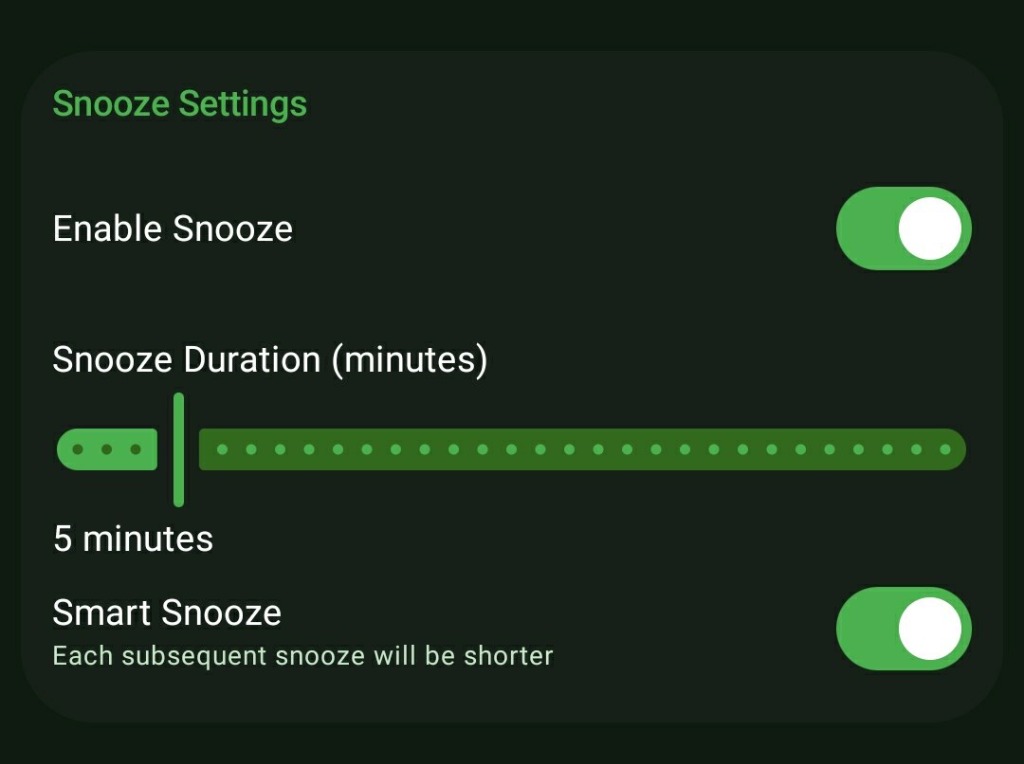
- When creating or editing an alarm, tap into the 'Snooze Settings' block.
- If you want the option to snooze, ensure the master 'Enable Snooze' switch is toggled on. If you want a brutal, one-shot alarm, turn it off.
- Drag the green slider to set your initial 'Snooze Duration' (anywhere from 1 minute up to the firm 30-minute maximum).
- Toggle 'Smart Snooze' at the bottom of the section to activate the shrinking interval algorithm.
- Use the 'Max Snooze Count' slider to limit total allowed snoozes (0 = Unlimited, up to 20). When the limit is reached, both the in-app snooze button and the notification 'Snooze More' action are removed.
Use Cases
Breaking the 'Snooze Loop': If you routinely hit snooze 4-5 times a morning, Smart Snooze completely dismantles this habit. By the third press, the alarm is ringing again in less than 60 seconds, making the act of snoozing more annoying than simply waking up.
Forced Accountability: By toggling the master Snooze switch completely off, you eliminate any safety net. When the alarm fires, your only option is to stand up and face your challenges.
Quick Notification Management: When you snooze an alarm and go about your morning, the Snooze Active Notification lets you dismiss or extend the snooze directly from the notification shade—no need to open the full app.
Hard Snooze Limits: Set the Max Snooze Count to 3 for your work alarm. After 3 snoozes, the snooze option disappears entirely, forcing you to face reality and get out of bed.
Screenshots
Frequently Asked Questions
Can I set my initial snooze duration to 45 minutes?
How small do the snooze intervals actually get?
How do I reset the Smart Snooze sequence?
What happens when the Max Snooze Count is reached?
Does the Snooze Active Notification drain battery?
Can I dismiss a snoozed alarm directly from the notification?
Ready to Upgrade Your Morning?
Install ReAlarm today to unlock Smart Snooze for free.
Get it on Google Play