Quiet Hours
Intelligently suspend your recurring Interval Alarms and daily reminders to protect your sleep schedule and deep work focus.
Overview
When you create daily routines using Interval Alarms (e.g., repeating every 2 hours), you risk those alarms continuing to ring relentlessly through the night or during critical meetings. Quiet Hours serves as the intelligent gatekeeper that aggressively prevents this exact scenario.
By defining a specific 'Start Time' and 'End Time', Quiet Hours acts as an overarching shield. Any Interval Alarm attempting to fire within this restricted window is automatically suppressed, ensuring your sleep schedule or core focus periods remain completely uninterrupted.
Capabilities
- Strict Start and End Boundaries: Define an absolute blackout window by setting precise Start and End times. Your alarms will immediately suspend once the start time is hit, and automatically resume their schedule exactly when the end time passes.
- Seamless Interval Integration: Quiet Hours is explicitly designed to pair perfectly with the Interval Alarms engine. You can set a "Drink Water Every 2 Hours" alarm globally, knowing Quiet Hours will force it to pause overnight without you having to disable the alarm manually.
- Zero Manual Intervention: Once configured within the individual alarm profile, the suppression and resumption happen automatically every single day entirely in the background.
How to Setup
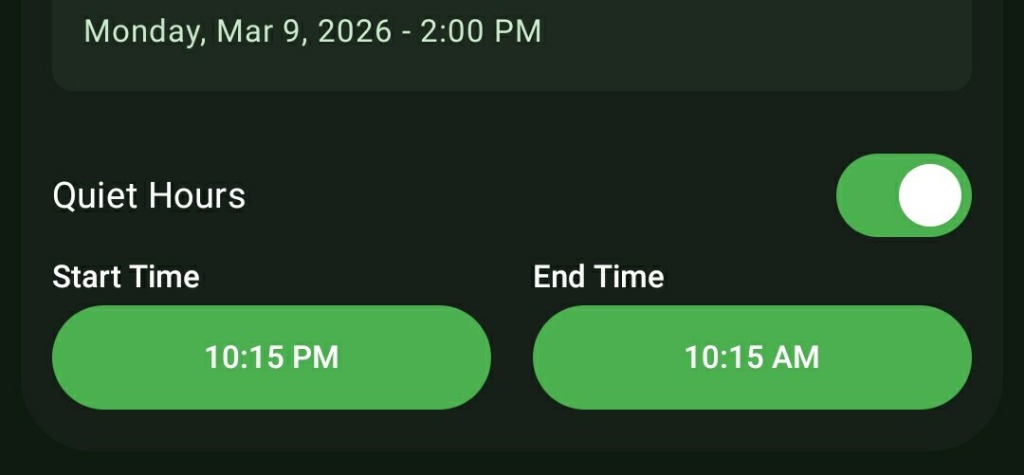
- While creating an Interval Alarm (or any supported repeating reminder), check the settings panel for the 'Quiet Hours' toggle.
- Switch the toggle to ON.
- Define your 'Start Time' (e.g., 10:00 PM when you go to sleep) and your 'End Time' (e.g., 7:00 AM when you wake up).
- Save the alarm. The interval sequence will now respect these hard limits.
Use Cases
The Hydration Routine: You want to be reminded to drink a glass of water every 3 hours to stay healthy, but you absolutely do not want an alarm to wake you up at 2:00 AM. Setting Quiet Hours from 10:00 PM to 8:00 AM solves this instantly.
Core Focus Protection: If you use ReAlarm to trigger stretching breaks every 60 minutes while working at home, you can configure your Quiet Hours from 5:00 PM to 9:00 AM, ensuring the reminders only fire during your standard office hours.
Screenshots
Frequently Asked Questions
Does Quiet Hours affect my normal morning wake-up alarm?
What happens if an interval falls exactly on my Quiet Hours End Time?
Can I have different Quiet Hours for different alarms?
Ready to Upgrade Your Morning?
Install ReAlarm today to unlock Quiet Hours for free.
Get it on Google Play