Smart Permission Manager
A visual guide to keeping Android restrictions at bay. Effortlessly diagnose and fix complex system blockers.
Overview
Modern Android operating systems (12/13/14+) aggressively kill background applications to save battery life. For an alarm app, being forcefully put to sleep means your alarm simply won't ring. ReAlarm solves this by integrating a dedicated Smart Permission Manager dashboard that actively monitors these OS restrictions and guides you safely through granting the mandatory exceptions required for reliable alarms.
Instead of burying you in confusing Android Settings menus, the dashboard acts as a live diagnostic tool, showing you exactly which critical permissions (like Full Screen Intents, Battery exemptions, or Draw Overlays) are missing and providing direct 1-tap buttons to fix them.
Capabilities
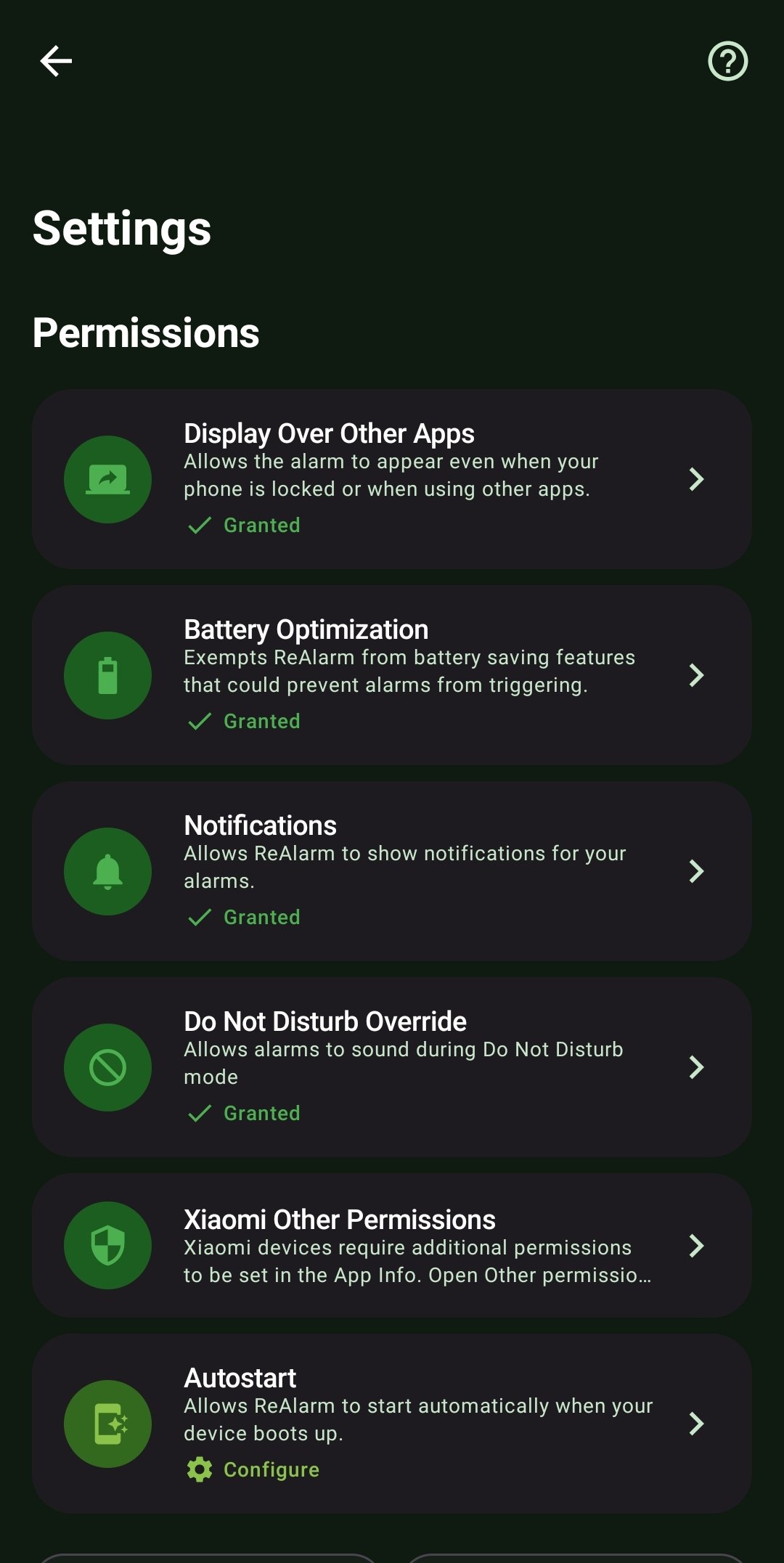
- Full-Screen Intent Authorization: On Android 14+, apps are no longer allowed to forcefully turn on your screen to show an alarm. The Permission Manager detects this and links you directly to the `ACTION_MANAGE_APP_USE_FULL_SCREEN_INTENT` setting to grant this absolute necessity.
- System Battery Exemptions: Analyzes 'Battery Optimization' APIs to ensure ReAlarm isn't accidentally paused or killed by Doze mode overnight. This relies on the core `REQUEST_IGNORE_BATTERY_OPTIMIZATIONS` system API.
- Display Over Other Apps: Ensures that even if you are actively using another app or playing a game when an alarm triggers, ReAlarm is authorized to overlay its UI smoothly on top.
- OEM Autostart Diagnostics: Highly specific manufacturers like Xiaomi (MIUI/HyperOS), Vivo, and Oppo have draconian 'Autostart' and hidden security settings. ReAlarm automatically detects your exact device manufacturer and provides tailored, direct links to these hidden menus to guarantee alarms survive system reboots.
How to Setup
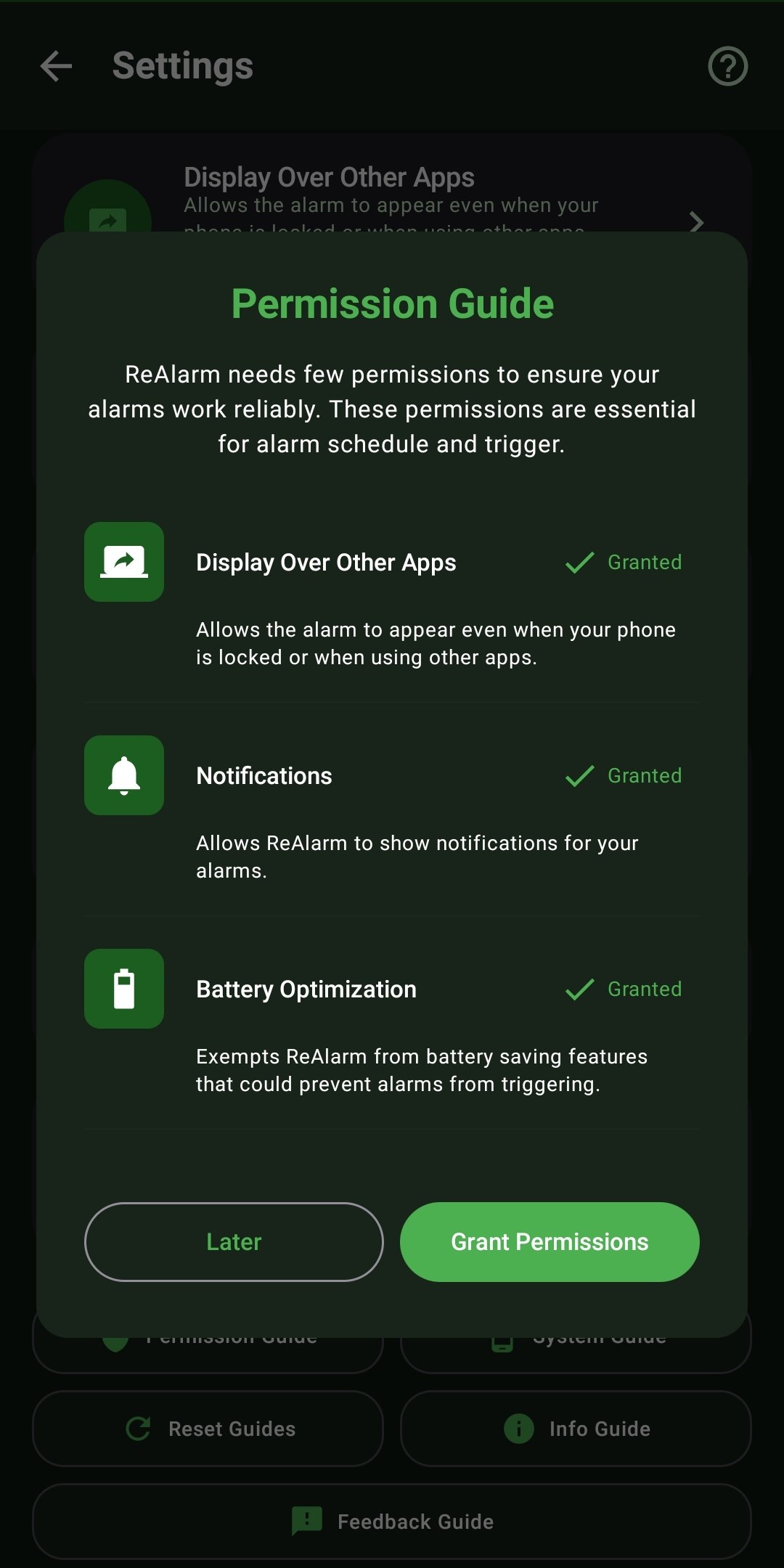
- Open ReAlarm and tap the 'Question Mark' helper icon at the top of the Settings page. If any critical issue is detected preventing an alarm, a persistent red banner will also appear on the main screen.
- Tap the banner to enter the Permission Guide dashboard.
- Tap 'Grant Permissions' to have ReAlarm intelligently route you to the exact buried Android Settings menu required for that specific permission.
Use Cases
The Missed Alarm Victim: You've experienced alarms mysteriously failing to go off because your Xiaomi phone's aggressive battery saver killed the app overnight. ReAlarm's Permission Manager flags this instantly, directing you to the exact 'MIUI Security Center' setting to whitelist the app.
Android 14 Upgrades: After upgrading to the latest OS, you notice alarms ring but don't show an absolute full-screen UI. The dashboard immediately detects the missing 'Full Screen Intent' authorization introduced in Android 14 and helps you restore the legacy UI capability.
Screenshots
Frequently Asked Questions
Why is 'Full Screen Intent' so important?
Will ignoring Battery Optimization drain my phone?
Are there permissions specific to my phone?
Ready to Upgrade Your Morning?
Install ReAlarm today to unlock Smart Permission Manager for free.
Get it on Google Play